 Organiq
Claude for SEO: how to analyze your own Search Console data with five prompts
· Organiq · third-party facts carry source and date in the text
Claude becomes an SEO analyst when it can read your data: connect the Organiq MCP connector (44 tools, OAuth 2.1) in claude.ai, Claude Desktop or Claude Code, then ask for quick wins, decaying pages, cannibalization, traffic from AI assistants and the weekly digest. Every answer states the property, the period and the comparison used.
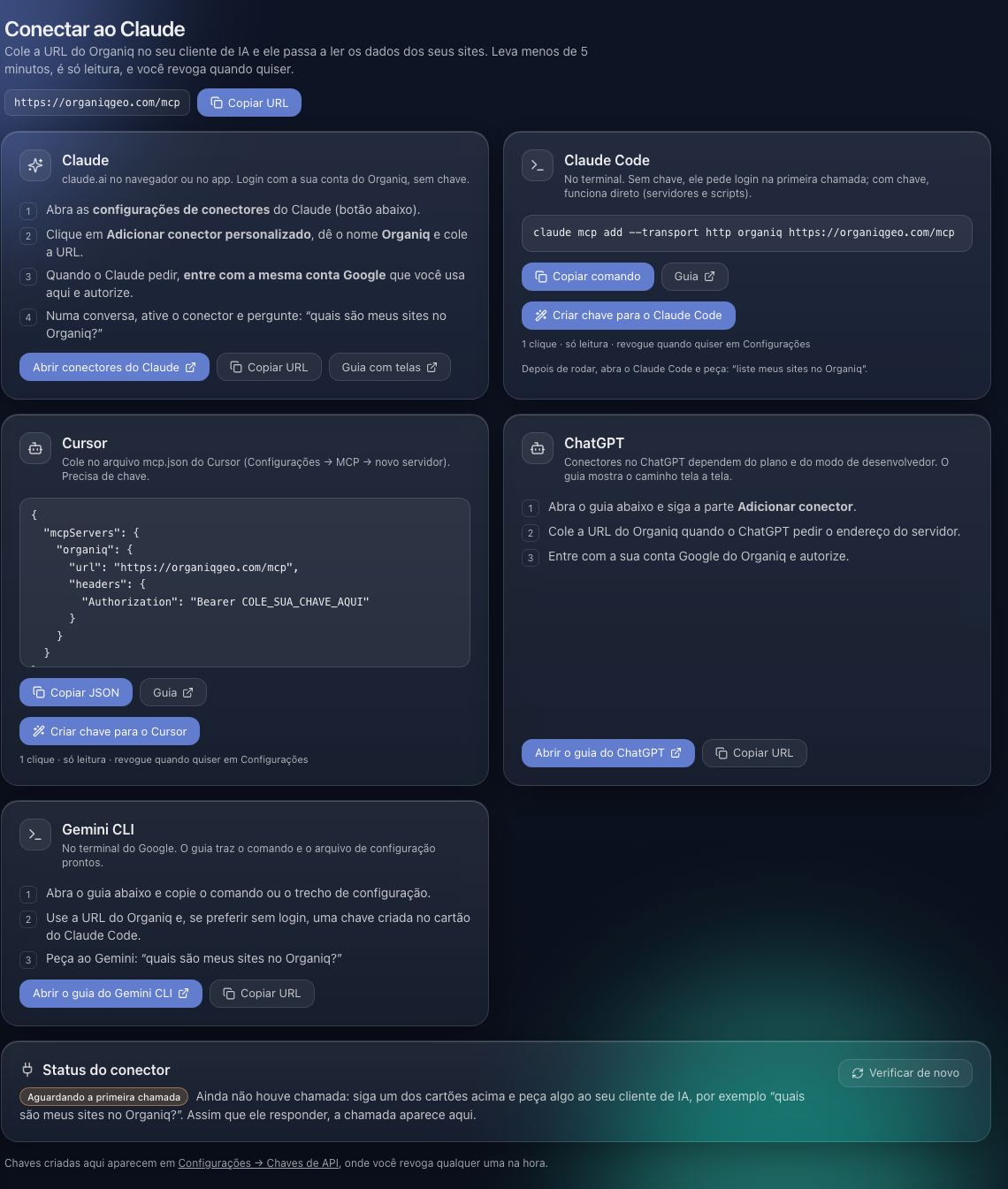
How do I connect Claude to Search Console?
- Create the account at app.organiqgeo.com and connect Search Console (read-only,
webmasters.readonlyscope); wait for the first sync. - In claude.ai: Settings → Connectors → Add custom connector → name
Organiq, URLhttps://organiqgeo.com/mcp, client ID and secret blank → Add → Connect → Google sign-in → Allow. Custom connectors require a paid Claude plan (October 2026). - In Claude Code:
claude mcp add --transport http organiq https://organiqgeo.com/mcpthen/mcp→ Authenticate. The plugin adds 7 skills (quick-wins, content-decay, cannibalization, weekly-report, ai-traffic, geo-audit, site-audit).
Step by step: connect to Claude.
Which prompts work in Claude today?
Five questions built on the tools that exist on October 30, 2026; replace example.com with your property's name (the connector accepts the display name, the Search Console URL or a unique substring).
| Prompt for Claude | Tools called | What comes back |
|---|---|---|
| "List my properties and tell me which ones have GA4 connected." | list_sites, check_connection | Properties in the account, last synced date, whether GA4 and Bing are linked. |
| "Quick wins for example.com in the last 28 days: queries with CTR below the expected for their position, ranked by estimated gain." | score_opportunities, get_ctr_curve | List with impressions, position, current vs expected CTR (the site's own curve) and clicks to gain. |
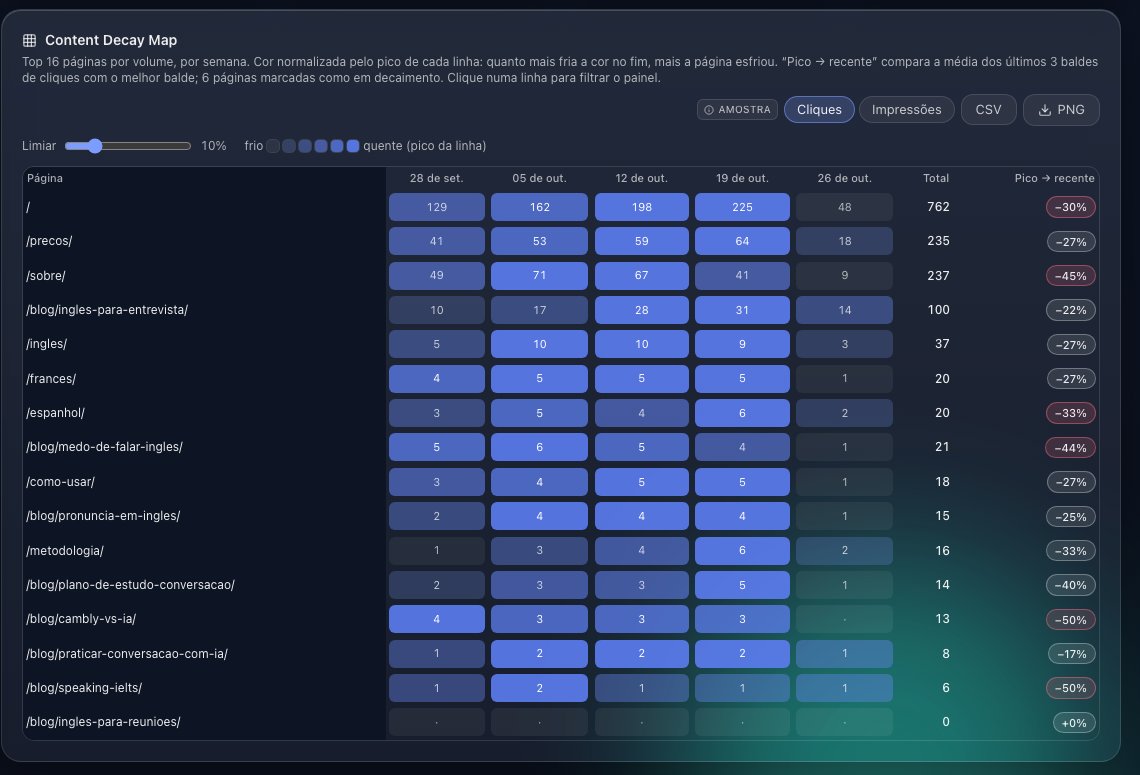
| "Which pages of example.com lost clicks versus six months ago, and which queries explain the drop?" | find_decaying_content, get_page_performance | Decaying pages with severity and baseline; for each, the queries that fell the most. |
| "On which queries of example.com do several pages compete, and which page should win?" | analyze_cannibalization | Queries with more than one ranking URL, split clicks and the best-positioned URL. |
| "How many sessions came from ChatGPT, Perplexity and Gemini this month versus last? Then write the weekly digest." | get_ai_traffic, get_weekly_digest | Sessions per assistant with change; 7-day digest with movers, anomalies and 3 actions. |
What should I check in Claude's answer?
- Period and comparison: every tool echoes the property, the period and the comparison used; if the answer does not mention them, ask "which period did you use?".
- Units: CTR is a fraction (0.052 = 5.2%); position is an impression-weighted average, lower is better.
- Freshness: the newest data is from D-3; Claude cannot see today or yesterday.
- What does not exist: search volume, backlinks and competitor data are not in the connector; if Claude quotes such numbers, they did not come from your data.
- Errors: a connector error comes with a
nextStep(for example, "connect GA4"); Claude should repeat it, not work around it.
What does Claude not do here?
It does not write to Search Console (no sitemap, removal or indexing request: Google access is read-only); the Organiq server never receives the conversation text, only the tool arguments; it cannot separate clicks coming from AI Overviews (Google does not expose them); and the free claude.ai plan does not accept custom connectors (October 2026). What Anthropic does with the conversation follows the terms of your Claude plan, not ours.
Frequently asked questions
Can I just upload a Search Console CSV export to Claude?
Yes, for a one-off analysis: export the Queries and Pages tables and attach them. The limits: Google exports the top rows only, the file stops at 16 months, there is no comparison period unless you export twice, and you repeat the export every time. The connector keeps the data live and compared.
Does it work in Claude Desktop?
Yes, as a custom connector with the same URL. In configurations without OAuth support, use the mcp-remote bridge with an API key created in the dashboard.
Are the plugin skills required?
No. The connector alone answers the questions; the skills (Claude Code) are playbooks that chain the tools in the right order, for example site-audit: summary, trajectory, mix, movers, decay, cannibalization and quick wins in one pass.
Can Claude produce the whole monthly report?
Yes: the generate_seo_report tool returns the full report in markdown in one call, with period, movers, decay, cannibalization, quick wins and AI traffic.
How much does it cost?
The connector is included in every Organiq plan, including Free (1 property, 90 days); claude.ai charges its own paid plan for custom connectors. In Claude Code your current subscription is enough.
Can I ask in Portuguese?
Yes. The tools carry descriptions in English and Portuguese and answer in the language of the question; tool names do not change.