 Organiq
AI Overviews and AI Mode impressions in Search Console: what the report shows and what it does not separate
· Organiq · third-party facts carry source and date in the text
Search Console has a generative AI performance report: impressions of your site's links in AI Overviews and AI Mode, by page, country, date and device, released to every site on August 31, 2026. The Google pages read on November 6, 2026 mention no clicks, CTR, position, queries or API for it.
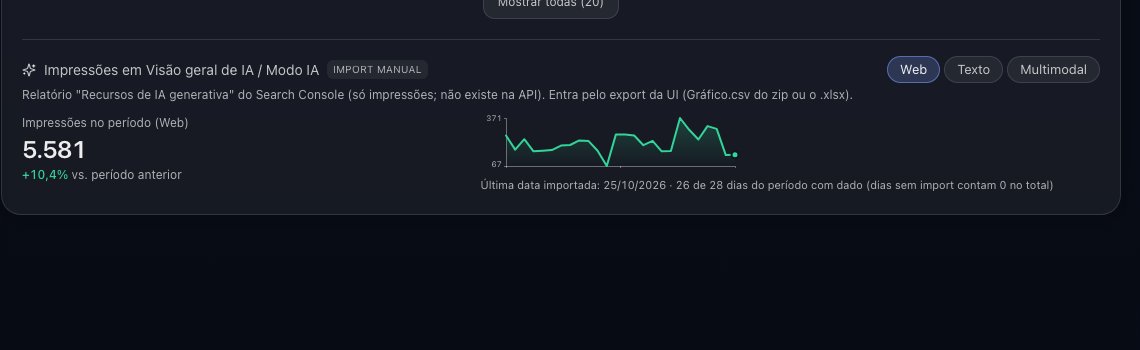
What does the Search Console AI Overviews report show?
Impressions: how many times links to your site were shown to a user in a generative AI feature on Google Search, today AI Overviews and AI Mode (Search Console Help, read November 6, 2026). Google announced the report on June 3, 2026 and released it to every site on August 31, 2026 (Google Search Central Blog, June 3, 2026).
- Dimensions: pages (the canonical URL), countries, dates (day, week or month, in Pacific Time) and devices (Search Console Help).
- Filters: "Web: text-based" (text search) and "Web: multimodal" (Google Lens, Circle to Search) (Search Console Help).
- Counting: two URLs of the same site in one answer count as 1 impression in the chart total; the page table counts each page, so the totals differ (Search Console Help).
- Left out: Search Labs experiments (Search Console Help).
- Export: the report has an export button for chart and table; "~" or "-" values download as zero (Search Console Help).
What does Google not separate?
Clicks, CTR and position from AI Overviews and AI Mode have no line of their own in the pages read on November 6, 2026. Google says this data "is included in the overall performance report", so it sits inside the Search totals with no split (Google Search Central Blog, June 3, 2026).
| Question | Generative AI report | Performance report (Search) |
|---|---|---|
| Impressions in AI Overviews and AI Mode | Yes, own view (Search Console Help) | Included in the total, no split (Google Search Central Blog, June 3, 2026) |
| Clicks, CTR and position of those features | Not mentioned on the help page | Included in the total, no split |
| Queries that showed the feature | The help page lists no query dimension | Queries of all Search, no filter by AI feature |
| AI Overviews apart from AI Mode | The help page lists text and multimodal filters and nothing else | — |
| API | Neither page mentions one; the Search Analytics API does not carry this report | Search Analytics API |
How does Organiq import the report?
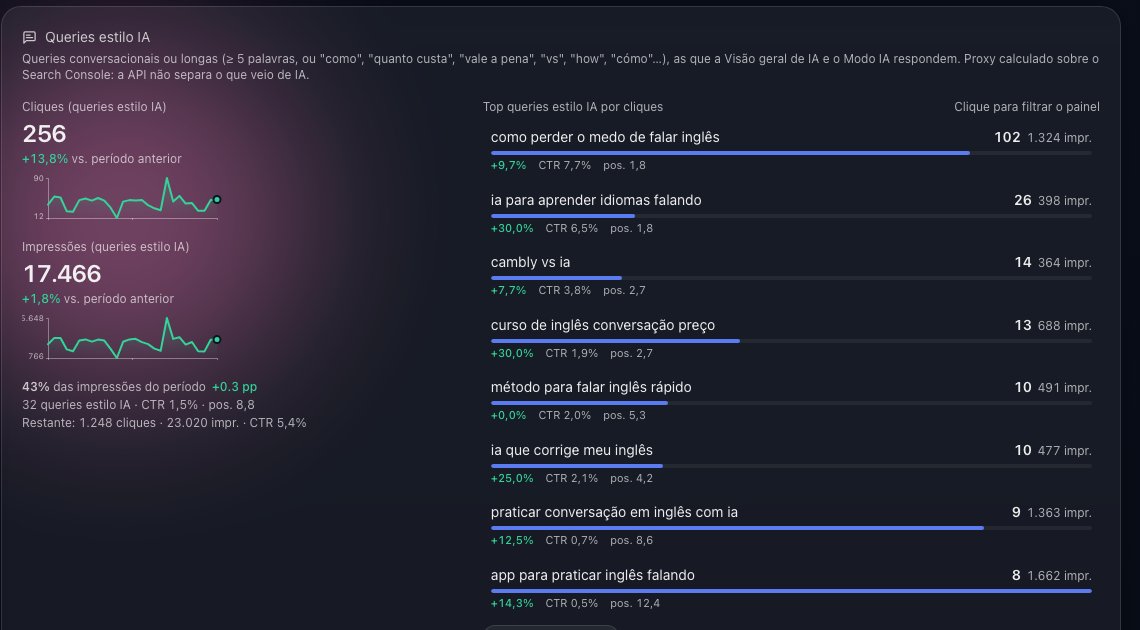
From the exported file, because the report is not in the Search Analytics API. Organiq stores the daily impressions series per property and per search type (all, text or multimodal); importing a newer file again updates the days. The tool needs the during the launch, all features are unlocked, no card required.
- In Search Console: Performance → generative AI features → Export (the CSV zip or the .xlsx; the daily series is the chart sheet, with date and impressions).
- Send the file to youssefpmat@gmail.com with the property name and the filter used (text, multimodal or none); the dashboard has no upload button yet.
- After the import,
get_genai_impressionsand the dashboard show the series with the import date.
How does an AI use this data?
Through the get_genai_impressions tool: the AI client asks for a period (default 28 days up to the last imported date), a comparison (previous period, previous year or none) and the search type. The answer has the period total and the comparison with the change, the daily series and the coverage (first and last date, import date); hasData: false when nothing was imported.
- Share: compare with the classic impressions of
get_site_summaryfor the same period. - Trend after a content change: the optimization cycle (how agencies run it) reads the series as context, not per query.
- Example question:
How many AI Overviews impressions did example.com get in the last 28 days versus the 28 before?
How does Organiq differ here?
In one factor the code proves, with the exception read on October 30, 2026 on the same line.
- Factor: an MCP tool for Google's generative AI performance report,
get_genai_impressions. - Comparison and exception: A tool for Google's generative-AI performance report (AI Overviews and AI Mode impressions): get_genai_impressions. Exception: the data enters through the CSV exported from Search Console, the tool needs the GEO add-on (included in Agency), and the tool lists of Suganthans-GSC-MCP, gsc-mcp-full and mcpsearchconsole.com were not checked. The GSC Wizard tool list read has no tool for this report (mcp.gscwizard.com).
- Where to see it: the
get_genai_impressionsrow of the tools table and the data sources column at MCP servers compared.
What should you not conclude from these numbers?
An impression is not a citation or a click: Google counts the link shown, not the read. Sessions from AI assistants are another measure, in GA4 (AI traffic in GA4); Copilot citations per page, another, in Bing (what is GEO). Metrics of different nature do not add up; show the 3 side by side with the collection date.
Frequently asked questions
Does Search Console show clicks from AI Overviews?
Not separately. The help page of the generative AI report mentions impressions only, and Google says this data is included in the overall performance report, so the clicks sit inside the Search total (read November 6, 2026).
Is there an API for the AI Overviews report?
None of the Google pages read on November 6, 2026 mentions one, and the Search Analytics API does not carry the report. Organiq imports the file exported from the interface.
Does the report separate AI Overviews from AI Mode?
The help page read on November 6, 2026 lists the filters "Web: text-based" and "Web: multimodal" and none per feature.
Why does the chart total differ from the table sum?
Because in the chart two URLs of the same site in one answer count as 1 impression; in the page table, each page counts its own.
What does Organiq need to show this data?
A file imported for the property and the during the launch, all features are unlocked, no card required. With no import, get_genai_impressions answers hasData false with the export path.